Under the hood: six connected SlabOS engines
Follow one countertop through the drawing spine, square-foot billing, slab nesting, pricing rules, recoverable revisions and AI answers that show their work.
Open video ↗A six-chapter buyer's guide to what the best all-in-one fabrication platform must do in 2026 — and the one screen that checks every box.
▶ The platform tour — playing now · tap for sound
The best software isn't the cheapest tab open or the most features on a page. It's the one system that runs the whole shop — and every box talks to the next.
Fig. 01 — Draw it in 2D. Watch it render in live 3D.
Quote in one product, schedule in another, track slabs in a third — re-keyed by hand.
Padding "to be safe" — yield you give away on every bid.
So the homeowner actually pictures the finished job — not a flat drawing.
DIY exports and spreadsheets to move your own history.
Legacy stacks split the shop across three products — one to quote (CounterGo), one to run jobs and the calendar (Systemize), and a separate Inventory product for slabs — leaving you to stitch them together by hand. You found a tool. Not the workshop.
Score anything you're evaluating against this. The best platform runs it all on one screen — nothing to stitch together.
Fig. 03a — Draw live in 2D, quote it in real time.
Fast 2D drawing with a real-time 3D engine. Draw once, see it in 3D as you go.
Priced as you draw, off your own price lists — edges, cutouts, thickness.
Nests pieces to fit more per slab. More yield, more margin on every bid.
Jobs, crew scheduling, and a calendar in the same system as your quotes.
A mobile crew app for onsite work, plus a customer portal for approvals.
Track inventory to the piece, in the same system that quotes the work.
Ask your own data in plain English, import price lists, and sync the books.
Accounts, quotes, jobs, history, and inventory moved across — drawings included.
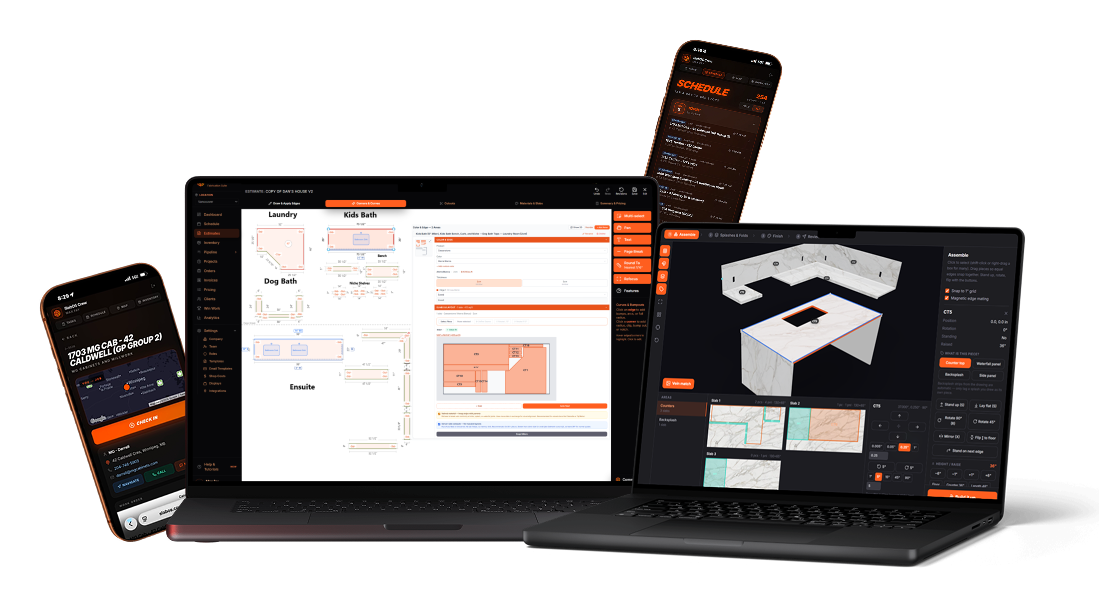
Fig. 03 — One login. Estimating desk, 3D studio, schedule, and the crew in the field.
Automatic nesting finds yield by hand you'd never have the hours to chase — so you keep more of every slab.
A checklist is only as good as the result. One shop used SlabOS nesting yield to underbid a $1M+ job — and kept their margin while doing it.
SlabOS clearly understands how to strike the right balance between fabrication and software. My only gripe: I didn't discover it sooner.
UI, integrations, performance, pricing ROI, sales features, support, onboarding, AI, the quoting engine, KPIs. Nothing to dislike — it's everything we've ever wanted.
This comparison reflects SlabOS's opinion of common patterns across the category as of 2026 — it is not a statement of fact about any specific competing product, which may differ or have changed. A dash (—) marks where SlabOS places its emphasis, not a claim that any other tool lacks a feature. Always evaluate each option directly against your own shop's needs.
The last box on the checklist is the one buyers forget: can you actually get there. So we move it for you — accounts, quotes, jobs, and the actual drawings. 20,000+ jobs have already come across.
“All of it came over in an afternoon — 18,000+ quotes and our full job history migrated in about 4 hours. Nothing was lost. We were quoting in SlabOS the same day.”
Fig. 05 — A real migration, in the owner's words.
Book a demo — we'll draw one of your real jobs in 3D, nest it onto a slab, quote it, and show you the whole checklist working on one screen.
One platform · one flat fee · unlimited seats · see pricing
One platform that runs the whole job — not a longer feature list, and not a cheap point tool that does one slice. The best software gives you fast 2D drawing with live 3D, automatic slab nesting, live pricing from your real price lists, scheduling and a crew app, slab inventory, a customer portal, built-in AI, and a done-for-you migration off whatever you're on now. SlabOS checks every box.
If all you need is to draw a countertop, maybe. But a single-slice tool does one slice of the job — you'll still need something to schedule it, track the slab, run the crew, and bill it, which means more products to stitch together. The legacy way splits that across three products — CounterGo to quote, Systemize for jobs and the calendar, and a separate Inventory product for slabs. SlabOS runs the whole shop in one platform. It's the difference between a wrench and the workshop.
One. Drawing, quoting, scheduling, slab inventory, the crew app, the customer portal, and AI are a single platform with one login and one flat bill — not three separate products (CounterGo for quoting, Systemize for jobs and the calendar, and a separate Inventory product for slabs) that you have to stitch together.
Yes — it's done for you, and it's why shops are leaving the old way. SlabOS migrates accounts, contacts, quotes (with the drawings), jobs, activity history, calendar, and slab inventory. One shop moved 20,000+ jobs across this way, searchable from day one.
One flat monthly platform fee for the whole system — drawing, quoting, scheduling, inventory, crew app, portal, and AI, with unlimited seats. One platform instead of three separate products to stitch together. See pricing, or book a call and we'll set the right plan for your shop.
SLABOS IN MOTION 01 FILMS
A closer look at the decisions, details and handoffs that make the work happen.
Follow one countertop through the drawing spine, square-foot billing, slab nesting, pricing rules, recoverable revisions and AI answers that show their work.
Open video ↗Choose a film to play Explore the collection →