
Nest three rooms together — beta
Cross Area Nesting puts a kitchen, bath and laundry using the same stone onto a shared slab layout. Each room keeps its own square-foot pricing.
Open video ↗Every slab you nest by hand leaves yield on the floor. SlabOS nests it automatically — more pieces per slab, fewer slabs, lower cost, room to underbid the shops around you.
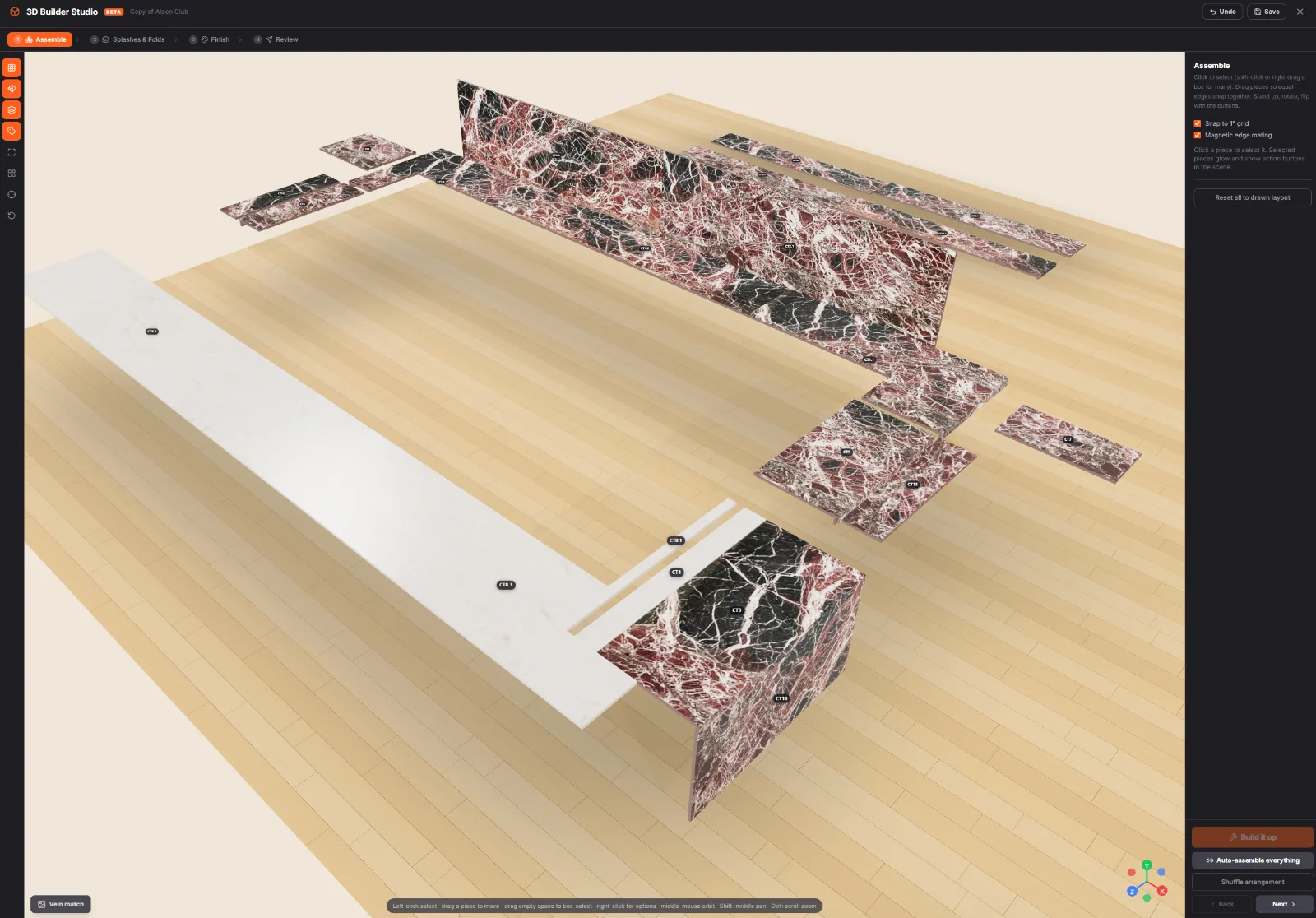
The SlabOS 3D builder — pieces assembled on the slab for maximum yield, before a single cut.
One kitchen goes through SlabOS Auto Nest four ways. Veined (the default) keeps strips with their parents, Tightest Fit uses the fewest slabs, Fastest Cutting (beta) aligns cut lines, and Cookie-Cutter (beta) repeats identical slabs for repeat units.
SlabOS: One job. Four nesting decisions.
The video has no voiceover. Everything below appears on screen, over an original instrumental score.
One job. Four nesting decisions.
The job is one kitchen: an L-shaped sink run split at the corner seam into CT1.1 (82.5 by 25.5 inches, with the sink) and CT1.2 (25.5 by 84 inches), a range run CT2 (60 by 25.5 inches) and an island CT3 (84 by 42 inches). It is 72.32 square feet in all: 4 pieces and 5 four-inch splash strips, nested on 126 by 63 inch slabs.
01, Veined, the default. It keeps strips with their parents and is best for veined stone. Result: 3 slabs. Each splash strip is cut on the same slab as its counter.
02, Tightest Fit. It maximizes yield and uses the fewest slabs, and it breaks the vein where that saves stone. Result: 2 slabs. CT1.1's back splash moves to Slab 2.
03, Fastest Cutting (beta). It adds to either mode and aligns cut lines, for fewer saw setups. Here it runs on top of Tightest Fit, and the result is still 2 slabs. The strips line up in rows, and the saw cut lines are drawn across both slabs.
04, Cookie-Cutter (beta). It repeats identical slabs. On one kitchen there is nothing to repeat: the result is the same 2 slabs. On a repeat-unit job of 6 kitchens and 6 vanities, it nests 4 slabs, and Slabs 1, 2 and 3 are identical (×3 identical). It is best for repeat units.
How to choose:
- Veined is for veined stone, and it is the default.
- Tightest Fit gives the fewest slabs.
- Fastest Cutting (beta) means fewer saw setups.
- Cookie-Cutter (beta) is for repeat units.
SlabOS. Nest it your way. slabos.com. Book a demo.
Notes: all layouts come from the SlabOS Auto Nest engine. The slab counts apply to this job.
Draw the job, see it in live 3D, and watch every piece drop onto the slab — in one place. Real product, playing now.
▶ The full platform tour — drawing, 3D & nesting, muted & looping · tap for sound
Slabs laid out by hand.
Pieces eyeballed onto a diagram.
Only the jobs you have time for.
The rest padded "to be safe."
Hand-nesting is slow, easy to get wrong, and only ever happens on a handful of jobs. The padding you bake in to be safe — that's the yield you give away, and the bid your competitor just won.
Materials, edges, pricing, and slab inventory — your shop, configured once. Then every quote nests against your real slabs automatically.
Invite the crew with unlimited seats. Every salesperson nests with the same logic — the yield edge stops swinging with whoever's drawing.
Hit nest and the engine goes to work — it rotates and re-fits every piece and cutout, testing tens of thousands of placements per slab to fit the most countertop out of the least stone. In seconds. Nobody lays out a slab that way by hand, on every job, on every revision.
One shop used SlabOS nesting yield to underbid competitors on a $1M+ job — and kept their margin.
Tighter nesting fit more countertops out of every slab, so they priced leaner without giving up a dollar. The slabs they didn't have to buy were the bid. Hand-nesting can't do that on every job — SlabOS does it on all of them.
“UI, integrations, performance, pricing ROI, sales features, support, onboarding, AI, the quoting engine, KPIs. Nothing to dislike — it's everything we've ever wanted.”
Laying pieces on a slab by hand is slow, easy to get wrong, and only ever happens on the jobs you have time for. SlabOS nests automatically — on every quote, every time.
This comparison reflects SlabOS's opinion of automatic slab nesting versus the common manual / by-hand approach to laying out countertop pieces on a slab. "By hand" describes a general workflow, not any specific product, and your own process may differ. A dash (—) marks where SlabOS places its emphasis, not a claim that any particular tool lacks a feature. Evaluate against your own shop's workflow.
Every offcut you didn't have to make is money you keep — and on a big bid, the slabs you saved are the difference between winning the job and watching it walk.
Hand-nesting leaves money on the floor of every job. Tighter layout drops straight to the bottom line — fewer slabs bought for the same countertop.
Less stone means you can underbid the shop next door and still keep margin. One shop used exactly that edge to underbid on a $1M+ job — the slabs they saved were the bid.
Read the $1M+ storyNo dragging pieces around a diagram. SlabOS nests on every quote, so the yield edge is on every bid you send — not just the handful you had time to optimize.
Found a point tool that just nests? Congrats — you found a tool. SlabOS runs the whole shop: live 2D + real-time 3D drawing, auto-nesting, live pricing from your real price lists, slab inventory to the piece, a customer portal, a mobile crew app, QuickBooks, built-in AI on your own data, and done-for-you migration. You're comparing a wrench to the workshop.
See what one platform costsYield gets you the job. The customer portal gets you the review — and the next one. Every homeowner gets their own branded link, built into SlabOS. Not a bolt-on.
They open their link and spin their own countertop in real-time 3D — the exact job you drew, in their hands.
Live status and ETA as the crew rolls out — the Uber-for-countertops feeling. They watch it happen instead of calling to ask.
The signed agreement lives in the portal — download it whenever, no email digging, no "can you resend that?"
Fewer "where's my counter?" calls. A premium experience the shop next door can't hand them. Margin from the nest, loyalty from the portal — both on every job.
The homeowner's portal — their counter in 3D, live crew tracking, e-signed contract.
The reason shops stay stuck is data. So we move it for you — accounts, quotes, jobs, and the actual drawings — so you're nesting against your real work from day one.
jobs already migrated off legacy platforms — drawings included.
Book a demo — we'll draw one of your real jobs in 3D, nest it onto a slab in seconds, and show you the yield you're leaving on the floor today.
It's SlabOS laying every piece of a job — runs, returns, islands, cutouts — onto your slabs automatically, packing them to fit more countertops out of the same stone. You draw the job once; SlabOS handles the layout. No more dragging pieces around a diagram by hand.
Tighter nesting means fewer slabs for the same job. Less stone is less cost, which is room to underbid the shop next door without cutting margin. That gap is the whole ballgame on a big job — one shop used exactly that yield edge to underbid competitors on a $1M+ job and keep the profit.
Hit nest and the engine rotates and re-fits every piece and cutout, testing tens of thousands of placements per slab to find the layout that fits the most countertop out of the least stone — in seconds. Nobody lays out a slab that way by hand, on every job, on every revision.
Yes. SlabOS tracks slab inventory to the piece, so nesting runs against your actual slabs — not a generic rectangle on paper. Drawing, nesting, pricing, and inventory are all the same system, so nothing gets re-keyed or lost between tools.
A point tool nests and stops there — you still need separate software to quote, schedule, run the shop, track slabs, and bill. SlabOS does all of it in one platform: draw, nest, quote, schedule, inventory, crew app, portal, AI, QuickBooks, and done-for-you migration. You're comparing a wrench to the workshop. See pricing.
One flat monthly fee for the whole platform — drawing, auto-nesting, quoting, scheduling, inventory, crew app, portal, and AI, with unlimited seats. See pricing, or book a call and we'll set the right plan for your shop.
SLABOS IN MOTION 14 FILMS
A closer look at the decisions, details and handoffs that make the work happen.
Cross Area Nesting puts a kitchen, bath and laundry using the same stone onto a shared slab layout. Each room keeps its own square-foot pricing.
Open video ↗Twenty minutes matching the vein by hand. Lock that slab, hit Auto-Nest, and everything else reshuffles around it. The locked slab comes back exactly as you left it, and an island seamed across two slabs holds both in place. slabos.com
Open video ↗Two pieces look clean on the slab. Underneath, they share 1/32" of stone. SlabOS flags any shared stone deeper than 1/64" with an exact check, not a sample. Edges that only touch stay clean. Cutouts count as empty space. Caught at the layout, not at the saw. slabos.com
Open video ↗Set the blade diameter and inspect straight-cut run-outs against the slab layout. See cut lines, overcuts and offcut run-outs before sending the work to the saw.
Open video ↗Use Seam All Pieces to apply suggested seams to oversized pieces, run one auto-nest and undo the operation together. Pieces still too long are flagged for review.
Open video ↗Move a piece across the slab photo, mirror a slab for a bookmatch, inspect the seam in Joint Cam and lock the selected layout. 3D Builder Studio is in beta. Review the slab image and final layout before fabrication.
Open video ↗Cookie-cutter nesting (beta) designs one slab layout for a group of identical units and stamps it, so repeat jobs nest in seconds and the saw cuts the same slab over and over.
SlabOS - Nesting: Cookie-Cutter (BETA) - all on-screen information as plain text
Video: SlabOS-Nesting-Cookie-Cutter-Beta-v1 (38 seconds, no voice-over, music and sound effects only)
Identical units. Different slabs?
Multi-family job, 6 units. Each unit has a kitchen L and a vanity.
12 pieces.
Kitchen L, 72 by 50 inches, times 6.
Vanity, 49 by 22 inches, times 6.
4-inch splash. Slabs 126 by 63 inches.
Tightest Fit — maximize yield.
Slab 1, Slab 2, Slab 3, Slab 4.
4 slabs. 4 layouts.
Every slab a different layout.
Check one box.
Tightest Fit — maximize yield (checked).
Cookie-cutter — repeat identical slabs (BETA) (checked).
Auto Nest.
Cookie-cutter (BETA).
Design one slab.
Slab 1, 126 by 63 inches: CT1 and CT2 (two kitchen L's, one turned 180 degrees so they interlock), CT7 (a vanity turned 90 degrees) and 4 splash strips.
2 kitchen L's + 1 vanity + 4 splashes.
Times 3.
One layout, stamped 3 times (Slabs 1, 2 and 3).
Slab 4: 3 vanities + 6 splashes.
Slab 1, times 3 identical. Slab 4.
4 slabs. 2 layouts.
Same slab count as Tightest Fit on this job.
Nests in seconds, instead of minutes.
The saw cuts the same slab over and over.
SlabOS. Repeatable layouts for repeat units.
Cookie-cutter nesting, beta.
slabos.com. Book a demo.
Notes: the slab layouts are real SlabOS Auto Nest engine output for this job. Cookie-cutter nesting is a beta feature.
Fastest cutting (BETA) runs on top of the SlabOS Auto Nest modes: pieces prefer positions that share cut lines with their neighbours, so the saw can run straight through aligned rows. On the same kitchen as our Tightest Fit clip, the layout lines its strips up in rows and still uses 2 slabs.
SlabOS — A Layout With Cutting In Mind (Fastest cutting, BETA). On-screen text, in order (no voice-over; the soundtrack is music and effects only).
More cut lines. More saw setups.
SlabOS · Fastest cutting (BETA).
One kitchen. CT1.1, 82.5 by 25.5 inches. CT1.2, 25.5 by 84 inches. CT2, 60 by 25.5 inches. CT3, 84 by 42 inches.
4 pieces, 5 splash strips, 4 inches high.
Nesting settings:
Veined material — keep strips with parents (not selected).
Tightest Fit — maximize yield (selected).
Fastest cutting — align cut lines, BETA (selected).
Auto Nest.
Auto Nest. Slab 1, 126 by 63 inches. Slab 2, 126 by 63 inches.
Slab 1 holds CT1.1, CT1.2 and CT2 with all five splash strips; Slab 2 holds CT3. Clean fit on both slabs.
Laid out for the saw.
Shared cut lines. Pieces share cut lines with their neighbours.
(On Slab 1, edges that line up are highlighted one line at a time: the top edge shared by five pieces, the line under CT1.1 shared with both 26-inch strips, the line between CT1.2 and its splash, the bottom of CT2 and its 60-inch strip, and the vertical lines where pieces and strips stand in rows.)
Fewer saw setups. The goal: the saw runs straight through aligned rows.
Still 2 slabs. Same slab count as Tightest Fit alone.
SlabOS. A layout with cutting in mind. Fastest cutting, BETA. slabos.com. Book a demo.
Notes: the layout comes from the real SlabOS Auto Nest engine (Fastest cutting on top of Tightest Fit, 126 x 63 inch slabs, 0.25 inch blade kerf, 0.5 inch slab border). Fastest cutting is a BETA setting. No machine-time or speed saving is claimed.
See what the quote takes from the nest: priced by the slab, SlabOS bills every slab in the layout; priced by the square foot, it bills the drawing's sq ft. One kitchen at $65.00/sq ft, 3 slabs vs 2.
SlabOS - Follow the layout into the quote (SlabOS-Nesting-Layout-To-Quote-v2). All on-screen information, in order.
Does the layout change the price?
Same kitchen. Two ways to price the stone.
Step 4: Materials & Slabs.
3 slabs. Slab 1, Slab 2, Slab 3, holding pieces CT1.1, CT1.2, CT2 and CT3 with their splash strips.
Veined material — keep strips with parents.
126″ × 63″ slabs. Taj Mahal White.
Step 5: Summary & Pricing.
Rate: $65.00 per sq ft.
Price stone by: Price list setting. Changed to: Slab (whole quote).
By slab. The slabs are counted: 1, 2, 3.
Quantity = every slab in the layout.
$10,750.35
Quote line: 3 slabs Taj Mahal White @ $3,583.45/slab.
Price stone by: Square foot (whole quote).
By sq ft. The pieces go back to the drawing.
Quantity = sq ft from the drawing.
Counters 64.61 + splash 7.71 = 72.32 sq ft.
$4,700.80
Quote line: 72.32 sq ft Taj Mahal White @ $65.00/sq ft.
Step 4: Materials & Slabs. Auto Nest.
Tightest Fit — maximize yield. The same pieces re-nest onto 2 slabs.
Step 5: Summary & Pricing.
2 slabs.
By slab: $7,166.90 (was $10,750.35, 3 slabs).
By sq ft: $4,700.80, no change.
One fewer slab. Same 72.32 sq ft.
Price by the slab? The layout counts.
Price by the sq ft? The drawing counts.
Price list default. Change it per quote.
SlabOS. Follow the layout into the quote.
slabos.com. Book a demo.
Pick the slab you actually have in inventory and SlabOS nests the job on its real, locked size: this kitchen: a 120 x 60 slab takes 4 slabs, a 126 x 63 slab takes 3.
SlabOS — Nest on the slab you actually own (all on-screen information, plain text)
Same kitchen. Which slab? One kitchen, 72.32 square feet: an L-shaped sink run (CT1), a range run (CT2) and an island (CT3).
Slabs you own: inventory slab SL-1188, 120 by 60 inches, and inventory slab SL-2047, 126 by 63 inches. Both are Taj Mahal White quartzite, 3 cm.
SL-1188 is picked. The slab size is locked to the real slab.
Nesting on SL-1188, 120 by 60. Auto Nest. Optimizing.
Result: 4 slabs. Slab 1 holds CT1.1, Slab 2 holds CT1.2, Slab 3 holds CT2, Slab 4 holds CT3, each with its own splash strips.
Mode: Veined material, keep strips with parents.
On 60-inch-tall slabs the L splits across 2 slabs.
Nesting on SL-2047, 126 by 63. Auto Nest. Optimizing.
Result: 3 slabs. Slab 1 holds CT1.1 and CT1.2, Slab 2 holds CT2, Slab 3 holds CT3.
Same job, same mode, same scale.
On 63-inch-tall slabs the whole L and its splashes share Slab 1.
Side by side: SL-1188, 120 by 60, needs 4 slabs. SL-2047, 126 by 63, needs 3 slabs. One fewer slab.
Same kitchen, real slab sizes. A 130 by 65 jumbo slab still needs 3 slabs.
SlabOS. Nest on the slab you actually own. slabos.com. Book a demo.
Layouts: this job is nested by the real SlabOS Auto Nest engine (default mode, standard 0.25 in blade kerf and 0.5 in slab border).
Change one dimension on the drawing, click Auto Nest, and SlabOS re-nests the job on real slabs: a 12-inch longer range run takes this kitchen from 2 slabs to 3, before any stone is ordered.
SlabOS - The drawing changes. Follow the nest. (26 seconds, no voice-over; music and sound effects only)
The drawing changes. A kitchen drawing with three countertops, CT1 (an L-shaped sink run with a sink), CT2 (a range run) and CT3 (an island), has already been nested on 2 slabs.
The CT2 range run is 60 inches. The user clicks the dimension and types 72. CT2 grows 12 inches on the drawing.
The pieces go back to the existing nest: 2 slabs, Slab 1 and Slab 2, nested with Tightest Fit, maximize yield. Pieces CT1.1, CT1.2, CT2 and CT3 are shown with their splash strips.
It doesn't fit. CT2 now runs 9.5 inches off Slab 1. The message reads: Run Auto-Nest to reflow.
The user clicks Auto Nest. Optimizing, 0 to 100 percent. Same job, same mode, same slab size.
Every piece and strip moves to a new layout: 3 slabs. Slab 1 holds CT1.1 and CT2, Slab 2 holds CT1.2, Slab 3 holds CT3. Every slab is a clean fit. It was 2 slabs and is now 3.
12 inches. One more slab. See it before you order.
SlabOS. The drawing changes. Follow the nest. slabos.com. Book a demo.
Layouts are real SlabOS Auto Nest engine results for this job (Tightest Fit, 126 by 63 inch slabs).
The same kitchen nested twice in SlabOS: Veined material keeps every splash strip beside its counter and uses 3 slabs; Tightest Fit packs strips on their own and gets this kitchen onto 2 slabs, at the cost of vein continuity at the splash.
SlabOS — What Tightest Fit actually changes (32-second silent website video; all information is on screen)
What does Tightest Fit actually change? Same kitchen, same slabs.
The job: a kitchen with four countertop pieces. CT1.1 is 82.5 by 25.5 inches and holds the sink. CT1.2 is 25.5 by 84 inches; together they make the L-shaped sink run, joined by a seam at the inside corner. CT2 is a 60 by 25.5 inch range run. CT3 is an 84 by 42 inch island. There are also five 4-inch splash strips.
The slabs are 126 by 63 inches, nested with a 0.25-inch blade kerf and a 0.5-inch slab border.
With the default mode, "Veined material — keep strips with parents", Auto Nest uses 3 slabs. Each splash strip stays next to its own countertop piece.
Switch one setting: tick "Tightest Fit — maximize yield" and press Auto Nest.
The same pieces re-pack onto 2 slabs: CT1.2, CT1.1 and CT2 (turned on its side) share Slab 1, and the island CT3 goes to Slab 2. Same pieces, same 72.32 square feet.
The trade: strips nest apart from their parents. CT1.1 is cut from Slab 1, but its 83-inch back splash is cut from Slab 2, so the vein can break where splash meets counter. Tightest Fit is best for granite or non-directional stone.
SlabOS. See the trade. Then cut. slabos.com — Book a demo.
Note: both layouts are real SlabOS Auto Nest engine results with identical inputs; slab savings depend on each job's pieces and slab sizes.
Veined material is the default nesting mode in SlabOS: Auto Nest keeps every splash strip on the same slab as its counter, so the vein carries across the joint. On this kitchen it uses 3 slabs where Tightest Fit uses 2.
SlabOS-Nesting-Veined-Mode-v1 — on-screen information (no voice-over; the clip is designed to play muted)
The vein breaks. In a Tightest Fit layout of this kitchen, the 83-inch back splash for counter piece CT1.1 lands on Slab 2 while CT1.1 itself is cut from Slab 1.
One kitchen: an L-shaped sink run split at the inside corner into CT1.1 (holding the sink) and CT1.2, a range run CT2, and an island CT3. Three counters, five 4-inch splash strips, one seam.
Veined material. The Step 5 nesting setting "Veined material — keep strips with parents" is the default; the other option is "Tightest Fit — maximize yield". Veined material refuses to break vein continuity at miter, splash or waterfall joints. Then Auto Nest runs.
On 126 by 63 inch Taj Mahal White slabs, every piece lands on the layout the Auto Nest engine produced: Slab 1 holds CT1.1 and CT1.2 with all three of their splashes, Slab 2 holds CT2 with both of its splashes, Slab 3 holds the island. Three slabs. Every strip sits on its parent's slab.
One more slab, on purpose. Tightest Fit used 2 slabs on this job; Veined keeps the vein.
The vein carries on. Pattern preview of Slab 1: the S4" 83" splash is cut directly above CT1.1, the S4" 84" splash directly above CT1.2, and the S4" 26" splash right beside CT1.2's end, so the stone pattern continues across each joint.
SlabOS. The pattern is part of the layout. slabos.com. Book a demo.
Notes: layouts are real SlabOS Auto Nest engine output for this job. Slab counts are for this job. No prices shown.
SlabOS works out the offcut from the saved slab layout before anything is cut: yield per slab, square feet of offcut for the quote, and saw run-outs that land in leftover stone. At the saw, the shop measures the real offcut and saves it with Create Remnant as its own slab with a -r1 serial, barcode and label, so it can turn up as matching stock on the next quote.
SlabOS — Know the offcut before the cut (SlabOS-Predicted-Remnant-Yield-v2)
All on-screen information, in order. No voice-over. Layout from a real SlabOS Auto Nest run.
What's left after the cut?
Slab 3, 126 by 63 inches, holds one piece: CT3, the island.
The layout sees it first.
Kitchen, Auto Nest. Veined material, the default mode. Three slabs, each 126 by 63 inches: Slab 1 holds CT1.1 and CT1.2, Slab 2 holds CT2, Slab 3 holds CT3.
Estimate, from the layout. Yield per slab: Slab 1 63.2%, Slab 2 23.6%, Slab 3 44.4%.
Saved layouts, 55.13 square-foot slabs. Pieces plus strips divided by slab area, before cutouts.
93.06 square feet of offcut. Yield 43.7% for the whole quote. Step 6, Slab waste (you only).
Estimate, before the cut. Show Cut Lines is switched on: the four saw cuts around the island are drawn, then eight dashed run-outs.
8 into offcut. Saw cuts clear. Run-outs that only scar leftover stone.
Measured, at the saw. Slab 3 is cut: the island goes to the job and the offcut beside it is measured, 63 by 41 inches.
Create Remnant from This Slab: Length (in) 63, Width (in) 41, Also mark the original slab as Consumed (ticked), Create Remnant.
Saved as a new slab: SL-2049-r1. Remnant, Available. Own barcode, linked to SL-2049. A label is printed for it.
Next quote. It comes back.
You have 1 matching slab available in inventory, including 1 remnant. View & use. Same material, color and thickness.
SlabOS. Plan the offcut. Keep the remnant. slabos.com. Book a demo.
Notes for the page:
- The estimate numbers are the ones SlabOS computes from this saved layout (piece and strip area against slab area). They show total leftover area, not the size of a usable remnant.
- The remnant size is measured by the shop and entered in Create Remnant from This Slab; SlabOS then saves it as its own slab with a -r1 serial, its own barcode and a link to the parent slab.
- None of the features shown carries a BETA label in the product.
Choose a film to play Explore the collection →