
Native Sales app coming soon
THE SHOP.
IN YOUR
BACK POCKET.
The customer has a question. The quote is on your phone. SlabOS Sales brings your day, your pipeline and your next conversation into one place—with mobile quoting and a saved-drawing 3D view a tap away.
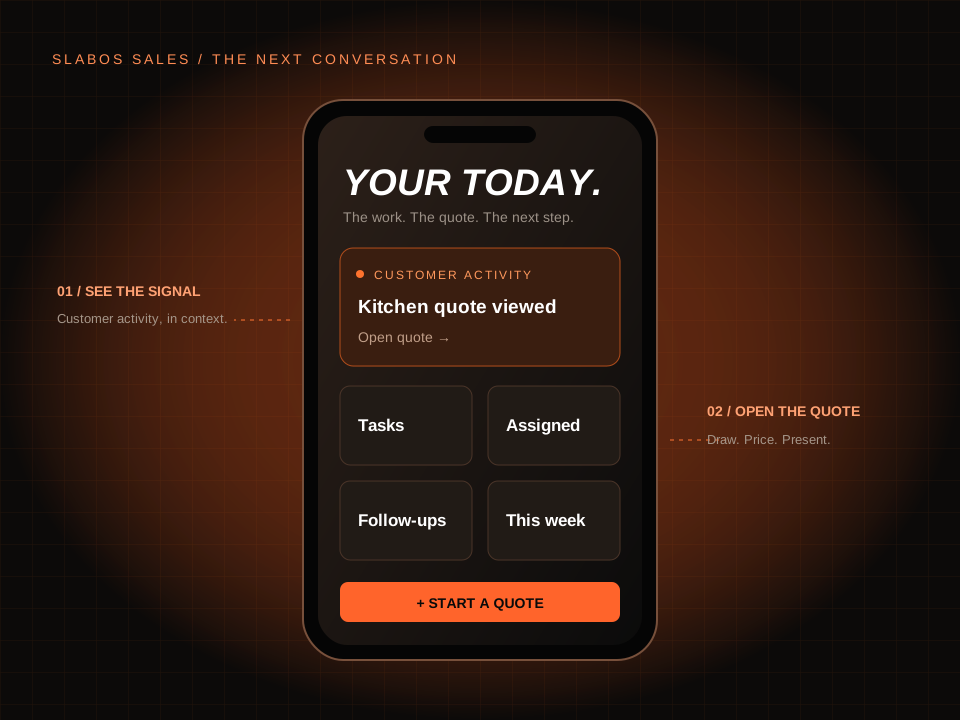
Your day
Start with the next conversation.
Today brings tasks, assigned work and follow-ups into the salesperson’s workspace. Hot leads surface recent customer activity, so you can open the associated quote and understand what happened before reaching out.
- See activity such as a quote view, approval, signature or customer AR view when it is recorded.
- Use Call, Text or Email when the quote has the corresponding contact details.
- Open the customer’s quote from the signal instead of searching for it again.
Your quote
Quote where the conversation happens.
Start a quote from Sales. Choose an account or create a standalone quote, capture contact and site details, then continue into the same drawing and pricing editor used by the desktop app. Save the work back to the quote.
- Keep the shop’s price-list context with the quote.
- Use the full quoting editor in a phone or tablet layout.
- Return to the quote to review documents and the next action.
Your presentation
The drawing becomes the conversation.
Open a quote with a saved countertop drawing and tap View in 3D. Rotate and zoom the model to help explain the layout. The viewer uses the saved quote geometry, or its saved published 3D layout when one is available.
- A read-only 3D presentation of the saved quote.
- Drag to rotate and pinch to zoom on touch devices.
- Use Edit drawing to change the design, then save before presenting it again.
Your follow-through
Keep the next step in sight.
Pipeline and follow-up views keep sales work connected to its quote. Review open, won or lost quotes, return to assigned leads, and continue into the available quote or contract actions. Access and available actions depend on the shop account and the quote’s state.
- Follow callbacks, cooling conversations and quotes that need a nudge.
- Preview a document, get its customer link or send it using the available templates.
- Use the quote board and team chat to keep the conversation connected.
Questions about SlabOS Sales App
What is SlabOS Sales?
SlabOS Sales is the salesperson’s mobile workspace for a SlabOS shop. It connects the daily sales view, assigned leads, quotes, follow-ups, customer activity and a saved-drawing 3D viewer.
Is the native app available to download?
The native Sales app is coming soon. The Sales web workspace is available to users with an authorized shop account. Ask for a demo to review the workflow and current rollout availability.
Does each salesperson need a shop account?
Yes. SlabOS Sales uses the shop’s sign-in and access controls. A shop owner or administrator manages access; the public pages do not expose customer records or private pipeline data.
Can a salesperson make and present a quote on a phone?
Yes. Start the quote in Sales, open the mobile drawing and pricing editor, and save. On a quote with a saved drawing, View in 3D opens the read-only model for rotation and zoom.
SlabOS Sales
The next conversation.
The same connected shop.
Walk through a quote, a customer signal and the next step with our team.
See Sales in a demo ↗Published by SlabOS · Workflow documentation reviewed October 6, 2026. Illustrations use demonstration data. Shop sign-in and appropriate access are required. Native Sales app coming soon.