Drawings get saved. Quotes get versioned. Emails sit in a thread. The phone call — where the actual promises get made — evaporates the second somebody hangs up. Unless it lands on the lead by itself.
Connect JustCall and it starts logging immediately — and the dialer comes with it: your reps call from the lead, the pipeline card or the quote they already have open.
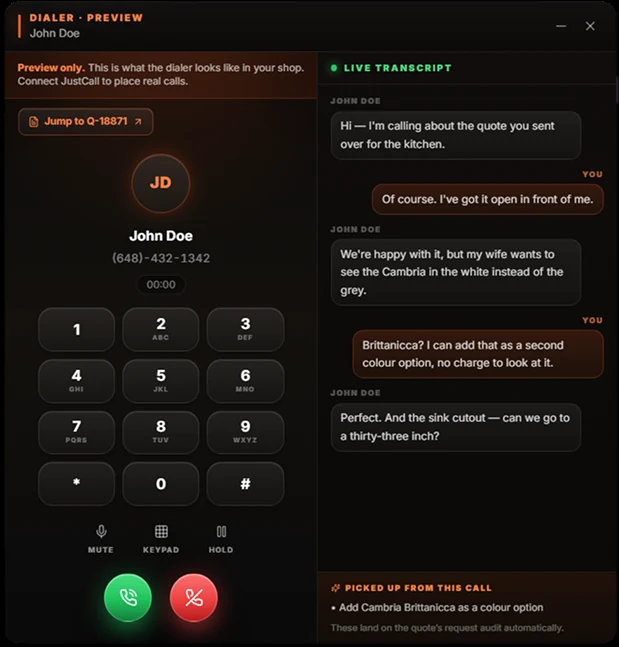
Dial from the record. The asks land on the quote by themselves.
A customer says you agreed to a mitred edge. You think you didn’t. The call was six weeks ago and the only record is what each of you remembers.
Nine times out of ten you remake it or discount it, because you cannot prove otherwise and the relationship is worth more than the argument.
The call log lives on a personal phone, not on the job.
Sometimes there's a note. It says “called cust.”
Whoever took the call, and they're on an install today.
Cheaper to remake than to argue about a phone call.
The number resolves to the lead and the activity attaches itself.
SMS lands in the same place as the calls, in order.
It doesn't depend on anybody remembering to do it.
Connect JustCall and every call and text your team makes or receives attaches itself to the right lead automatically, matched on the phone number. Nobody logs anything. Nobody writes “called cust” in a box.
Inbound and outbound, calls and texts, on the record the moment they happen.
A Call button on the lead, the pipeline card and the quote — one click and the dialer opens beside a live transcript panel, with a jump-link back to the quote the call is about. Minimise it and the call keeps going while you work.
And when a record has no number, the button says so in red instead of hiding — because a lead you can’t call is a data gap your rep should see.
Lead, pipeline card or quote — the dialer opens right there, with a headset and a browser.
With JustCall IQ, every finished call lands with a transcript and an AI summary — and the asks show up on the quote’s request audit, tagged as phone requests.
Calls placed from SlabOS log themselves exactly like the rest — and a Calls tab on the quote holds the whole history with that customer.
Every touch on the customer in one chronological record.
Not just to whoever answered the phone.
Activity feeds the per-rep and per-source numbers on the board.
The value isn’t the call log on its own — it’s that the call sits in the same timeline as the email thread, the quote revisions and the site photos.
One story, in order, readable by whoever picks the job up next.
Every shop has somebody whose head holds the customer history. When they go, it normally goes with them — and the phone calls are the first thing lost, because they were never anywhere but their handset.
Here the account’s calls are on the account. The person who takes over inherits a record instead of a briefing.
The next person reads the history instead of being told it.
The account stops being a person and starts being a record.
Pricing rules, drawings and now conversations all live in the shop.
Book a demo and bring a real dispute — the remake you ate, the change nobody logged. We'll show you what the record would look like if the call had been on the lead, and switch on dialling for your shop while we're at it.
A JustCall account connected to your tenant — that's it. Calls and texts start attaching to leads by phone-number match straight away, and the in-app dialer switches on with it. Transcripts and AI call summaries come from JustCall IQ, their add-on: with it, every finished call lands with a transcript and the asks feed the quote's request audit; without it, the recording is still kept.
Because shops have different phone setups and we'd rather check yours than have it half work. It's a five-minute conversation, not a waiting list.
No, it connects to it. Your team keeps their numbers and their handsets; SlabOS becomes where the record of the conversation lives.
Recording is handled by your phone provider and their settings, and recording-consent law varies by state and province — several require every party to consent. Worth a short conversation with your lawyer before you rely on it, whichever platform you're on.
It follows the same role-based permissions as the rest of SlabOS. Reps can be scoped to their own leads, owners see everything, and crew roles don't get the sales record at all.